 mquiz
mquizMake a quiz in minutes.
Play it ten ways.
Fix what they got wrong.
Students join with a 6-letter code — no account, no email address, nothing to install. Every quiz ends with a retry set built from just the questions they missed.
- Free, with no paid tier
- No app to install
- Works on the class projector
Which planet is closest to the Sun?
From a list of questions to a class playing it, in one sitting.
There is no setup, no seating plan to import and no licence to arrange. Three steps, and the third one is the one nobody else does.
- 1
Write it, or paste it
Type questions straight into the builder, or paste the list you already have — a Word document, last year's worksheet — and mquiz splits it into questions and answers. It autosaves as you type.
- 2
Share a 6-letter code
One code and anyone can play, on a phone, a tablet or a Chromebook. Nothing to install and no accounts to hand out. Or host it live and put the scoreboard on the projector.
- 3
Fix what they missed
Every wrong answer shows the right one and why, straight away. Then the retry set: only the questions that student got wrong. You get a per-question breakdown for the whole class.
Step one, in full
A question on one line, the answers under it, a * on the right one, a blank line between questions. It forgives numbering, bullets, ticks instead of stars, and everything else Word adds on the way out.
Which gas do plants take in?Questions appear here as they are recognised.
A score says 16 out of 20. It doesn't say which four.
Most quiz tools hand back a number and move on, which leaves the most useful thing that just happened — the four a student got wrong — sitting in a database nobody opens. mquiz turns those four into the next thing they do.
One attempt
20 questionsTheir retry set
waiting- A miss is information, not a penaltyThe moment an answer is wrong, the right answer appears with the explanation the teacher wrote. Nothing is deducted, no streak is broken and nothing is hidden until later.
- Built per student, not per classTwo children who missed different questions get different retry sets. A whole-class recap is a different tool; this is the one each of them needed.
- And the teacher sees the patternThe same data, the other way up: every question ranked by how the class did, hardest first. That is the list of what to go over tomorrow morning.
One quiz. Ten games. The questions never change.
Write a quiz once and it plays ten different ways — five for the whole class on the projector, five for one student on their own. Nothing about the questions changes; only the game around them does.
The Vault
The whole class against one locked door. Nobody competes, and nobody loses.
A wrong answer lets the door repair a little — and no name is ever shown for it, so a child who misses is never held up in front of the room.
Keymaster
One chest for the whole class, with a single master key hidden in it. Every key turned flips face-up for the room.
Team Battle
Three random teams — Blue, Purple and Green. Right answers score, and earn chests full of boosts, raids and shields.
Individual Battle
Pick a colour and race for points. Fast answers score more, and one question is secretly worth ×3.
Gem Quest
Every right answer opens a chest with a gem inside — or a steal, or a swap. Most gem value wins.
The boring parts, done properly.
A quiz tool lives or dies on the things nobody demos: getting your existing questions in, finding out who hasn't done it, and printing a copy for the child with no device.
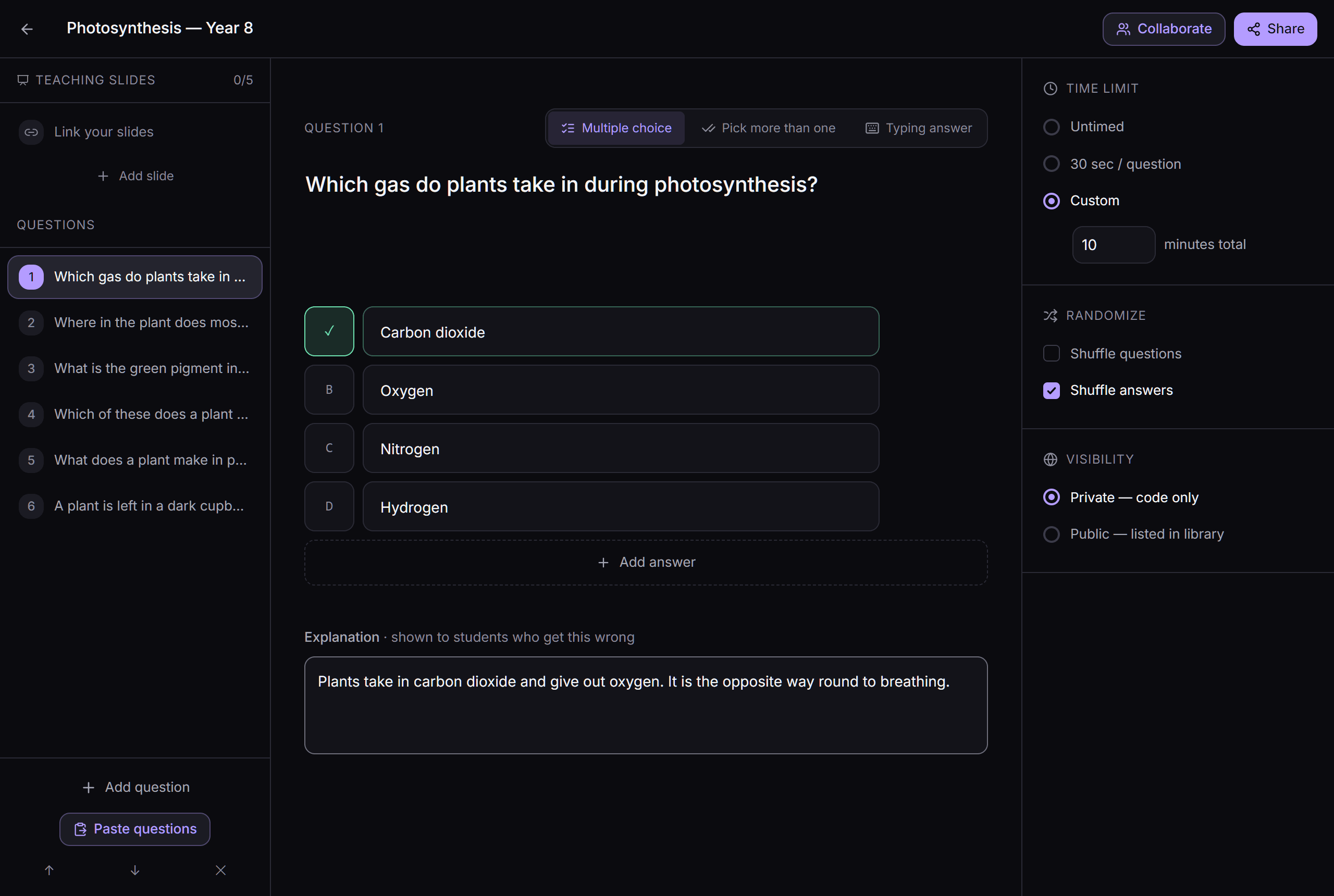
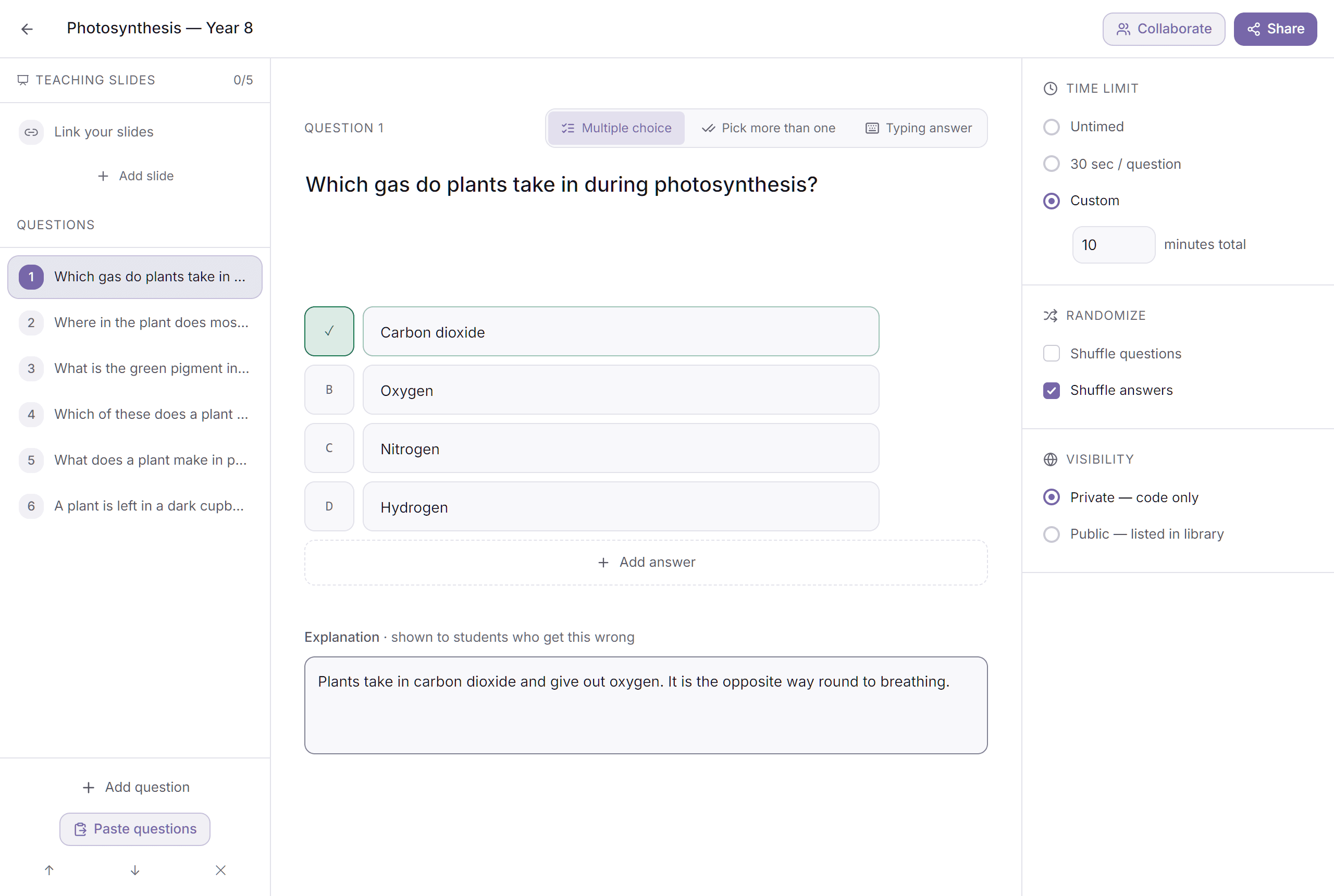
- Paste, don't retypeYour questions are already written down somewhere. Paste the list and mquiz reads it — numbering, bullets, ticks and everything else Word leaves behind.
- Three kinds of questionMultiple choice, pick-more-than-one, and type-the-answer. Each one takes an explanation, shown to anyone who gets it wrong.
- Teach it firstUp to five slides before question one — or paste the address of a deck you already have. Google Slides, PowerPoint, Canva and PDFs play embedded. Slides are skippable and cost no marks.
- A class registerBuild a class once, sort it into groups, and assign a quiz to it. You can match a child who played as a guest back onto the register.
- Who's done it — and how it wentTwo lists: still to do, and finished. Then every question ranked by how the class did, with the most common wrong answer next to each.
- Host it liveA one-time game code, the scoreboard on the projector, and five formats to run it in. Two games of the same quiz at once if two classes need it.
- A paper copyA question sheet and a separate answer key, straight from the browser. No export, no PDF plugin.
- Or borrow onePublic quizzes other teachers have shared, plus curated packs. Copy one and it's yours to edit.
A reason to come back that isn't a grade.
None of it is worth marks and none of it changes a score. It is there because a child who opens mquiz on their own has already done the hard part.
- No email address, everA username and a password is a whole account — children don't need an inbox, and we don't need one from them. Or play as a guest with just a first name and nothing else.
- Every attempt, keptTheir own history, with a redo button on each one. Sign in after playing as a guest and everything already played follows them in.
- Trophies and a daily streakThirteen trophies for things worth doing — a clean run, a set of mistakes cleared, a month of turning up. No leaderboard.
- Friends and duelsAdd a friend, then challenge them on the same quiz and compare afterwards.
- Points, spent on how it looksPlaying earns points. Points buy avatars, a face you build yourself, and eighteen colour themes — never anything that helps you score.

Fourteen free themes
Try one — it recolours this page, and it will still be your colour when you sign in.
Four more are gradients, at 15 points each.
Built for a room full of children.
Anonymous play is the default, which means the safest thing we can do about children's data is not to hold any. Everything below is enforced in the product, not just written down here.
- No email address from a childA student account is a username and a password. A guest gives a first name and nothing else — no email, no surname, no class list to upload.
- Bad language is filteredEvery place a child can type — a name, a quiz, a report — is checked in English and Romanian, and what was caught is kept for our moderators rather than silently starred out and forgotten.
- Anyone can report a questionA student who thinks a question is wrong or unfair can say so from the question itself. It reaches whoever made the quiz, and they can reply.
- Accounts can be stoppedAn account that keeps at it can be suspended — and it is shown the reason rather than just being locked out, so the child knows what happened.
- Old data is deletedAnonymous attempts and moderation records are purged after twelve months. Attempts that belong to an account are kept while the account is, because looking back at what was missed is the point of the thing.
- No analytics until you say soNothing is measured until the cookie banner is answered yes — and never at all on the routes children play quizzes on.
The full detail is in the privacy policy and the terms, both readable without signing up.
Nothing. There is no paid tier.
No trial, no seats, no card, and no feature held back for a plan that doesn't exist. The points a child earns come from playing and cannot be bought with money.
The only limits are there to keep it up
Per account, so one person cannot sit on it all afternoon. Cross the question limit halfway through a quiz and you still finish that quiz — being cut off mid-question would lose the work and teach nothing.
- 40
- quizzes played a day
- 500
- questions answered a day
- 8
- new quizzes made a day
The things people ask first.
Do students need an account?
No. They open mquiz.eu/join, type the 6-letter code and a first name, and play. If they sign in later, everything they already played is quietly attached to the new account.
Do children need an email address?
No. A student account is a username and a password — no inbox required, and none asked for. Teachers sign in with a magic link sent to their email, so there is no teacher password to forget either.
Is mquiz really free?
Yes. There is no paid tier, no trial and no card. The only limits are per-account daily caps — 40 quizzes played, 500 questions answered and 8 quizzes created a day — which exist so one account cannot monopolise the servers.
What do students need to install?
Nothing. It runs in any modern browser on a phone, tablet, Chromebook or laptop. Classes that want it on a home screen can add it like an app, but nothing has to be installed for a quiz to work.
Can I reuse questions I have already written?
Yes, and this is the fastest way in. Paste your list — a question per line, its answers underneath, a star on the right one, a blank line between questions — and mquiz builds the quiz. It copes with numbering, bullets and ticks instead of stars.
What happens when a student finishes a quiz?
They see their score, and then a retry set built from only the questions they got wrong. Every wrong answer shows the right one plus the explanation the teacher wrote. Nothing is deducted for a miss.
Can the whole class play together on the projector?
Yes. Hosting a quiz creates a one-time game code and a scoreboard page for the projector, in five formats — including The Vault, where the class works together against one target and nobody loses. You can run two games of the same quiz at once for two classes.
Can I print a quiz on paper?
Yes. Any quiz prints as a question sheet with the answer key on its own page, straight from the browser — deliberately black on white whatever theme the site is in.
How do I see how my class did?
Two views. Who has finished and who has not, matched against your class register; and every question ranked by how the class went, hardest first, with the most common wrong answer beside each one.
Is there a light mode?
Yes. Night is the default and what the design is tuned for, but day mode is one tap away and follows an account between devices, along with whichever of the eighteen colour themes they picked.
How is this different from Kahoot or Quizizz?
The overlap is the live class game on the projector. The difference is what happens afterwards: mquiz is built around the retry set, so a finished quiz produces a personal follow-up for each student rather than a score and a podium. It also needs no student accounts, has no paid tier, and prints to paper.